scroll-helper
Scroll Helper - Support
Welcome to Scroll Helper!
Scroll Helper adds customizable floating scroll buttons to webpages, making it easy to navigate long pages with a single click.
Too bored to read? Completely understandable!
Scroll down the image for more detailed instructions
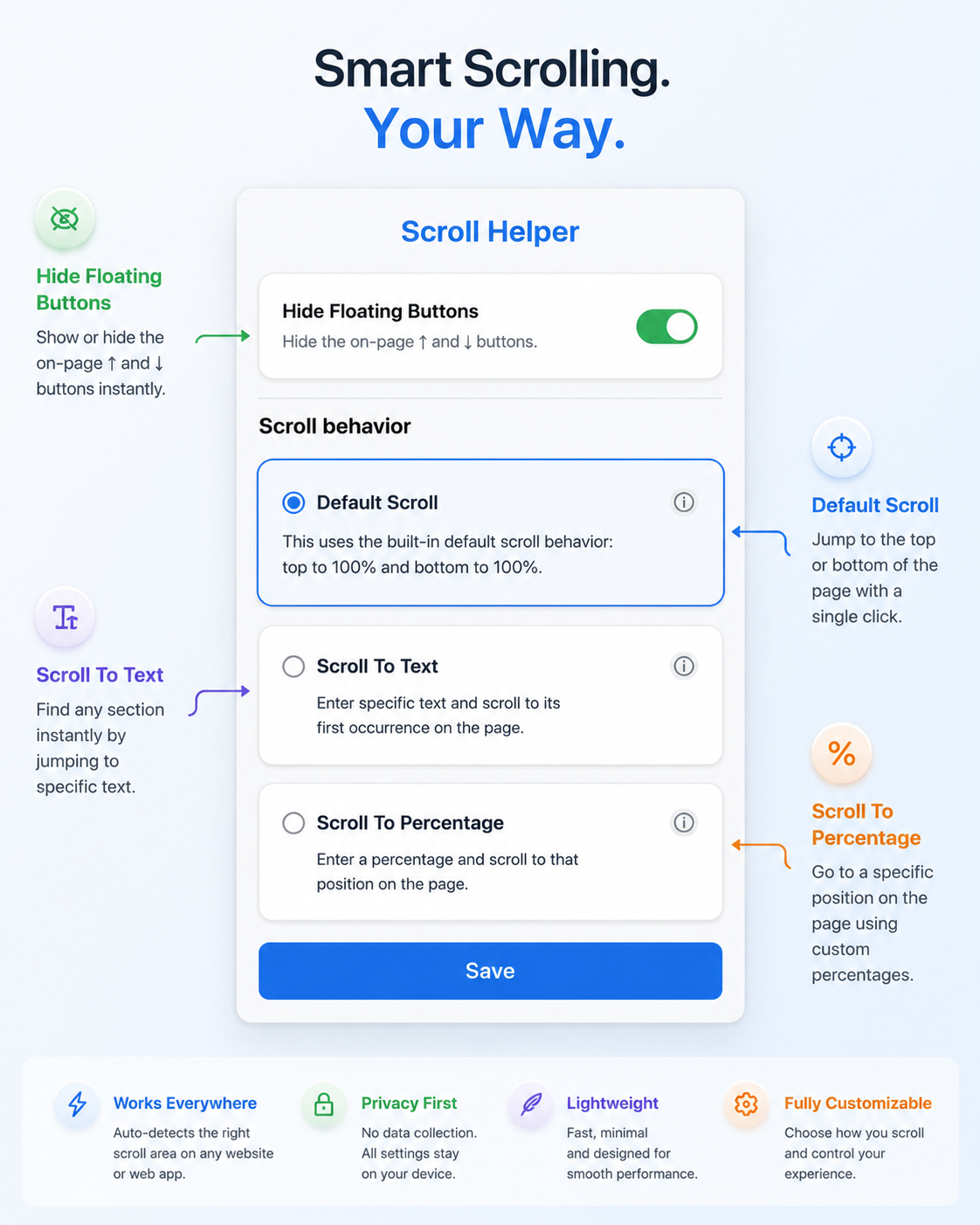
Features
Default Scroll
The default mode behaves like standard page navigation.
- ↑ Scrolls to the top of the page.
- ↓ Scrolls to the bottom of the page.
Works on both traditional websites and modern web applications.
Disable Buttons
Enable this option to instantly hide the scroll buttons, if it is blocking your view or overlapping other links or buttons.
Scroll to Text
Instead of scrolling to the top or bottom, you can configure each button to jump to specific text on the page.
Example:
↑ Button Text: Introduction
↓ Button Text: Contact Us
Clicking:
- ↑ scrolls to the first occurrence of Introduction
- ↓ scrolls to the first occurrence of Contact Us
Notes
- Text matching is case-insensitive.
- Exact matches are preferred.
- If no exact match is found, Scroll Helper searches for a partial match.
- If no matching text exists, a small notification is displayed.
Scroll to Percentage
You can configure both buttons to scroll to a percentage of the page.
Example:
↑ Button: 10%
↓ Button: 10%
This means:
- ↑ scrolls to 10% from the top.
- ↓ scrolls to 10% from the bottom.
Hide Floating Buttons
Prefer a cleaner page?
Enable Hide Floating Buttons from the popup to temporarily hide the on-page controls.
You can enable them again at any time from the extension popup.
Automatic Scroll Detection
Many modern websites don’t scroll the entire page.
Instead, they scroll individual containers.
Scroll Helper automatically detects the active scrollable area, allowing it to work correctly on sites such as:
- ChatGPT
- GitHub
- Gmail
- Notion
- Jira
- Confluence
- X (Twitter)
- and many more.
Privacy
Scroll Helper:
- does not collect personal data
- does not track browsing history
- does not send page contents anywhere
- does not require an account
All settings are stored locally inside your browser.
Frequently Asked Questions
The buttons don’t appear.
Make sure Hide Floating Buttons is turned off.
Then refresh the webpage.
Scroll to Text doesn’t find my text.
Scroll Helper searches for visible page text.
Some websites load content dynamically after the page opens. Try waiting a few seconds and clicking again.
Why doesn’t it work on every website?
Some highly customized websites restrict or replace normal scrolling behavior.
Support is continually improving with future updates.
Feedback
Found a bug?
Have an idea for a feature?
Please open an issue on GitHub:
https://github.com/nishant-10/scroll-helper/issues
Version
Current Version: 1.1.0