scroll-helper
Scroll Helper
A lightweight Chrome extension that adds customizable floating scroll buttons to every webpage.
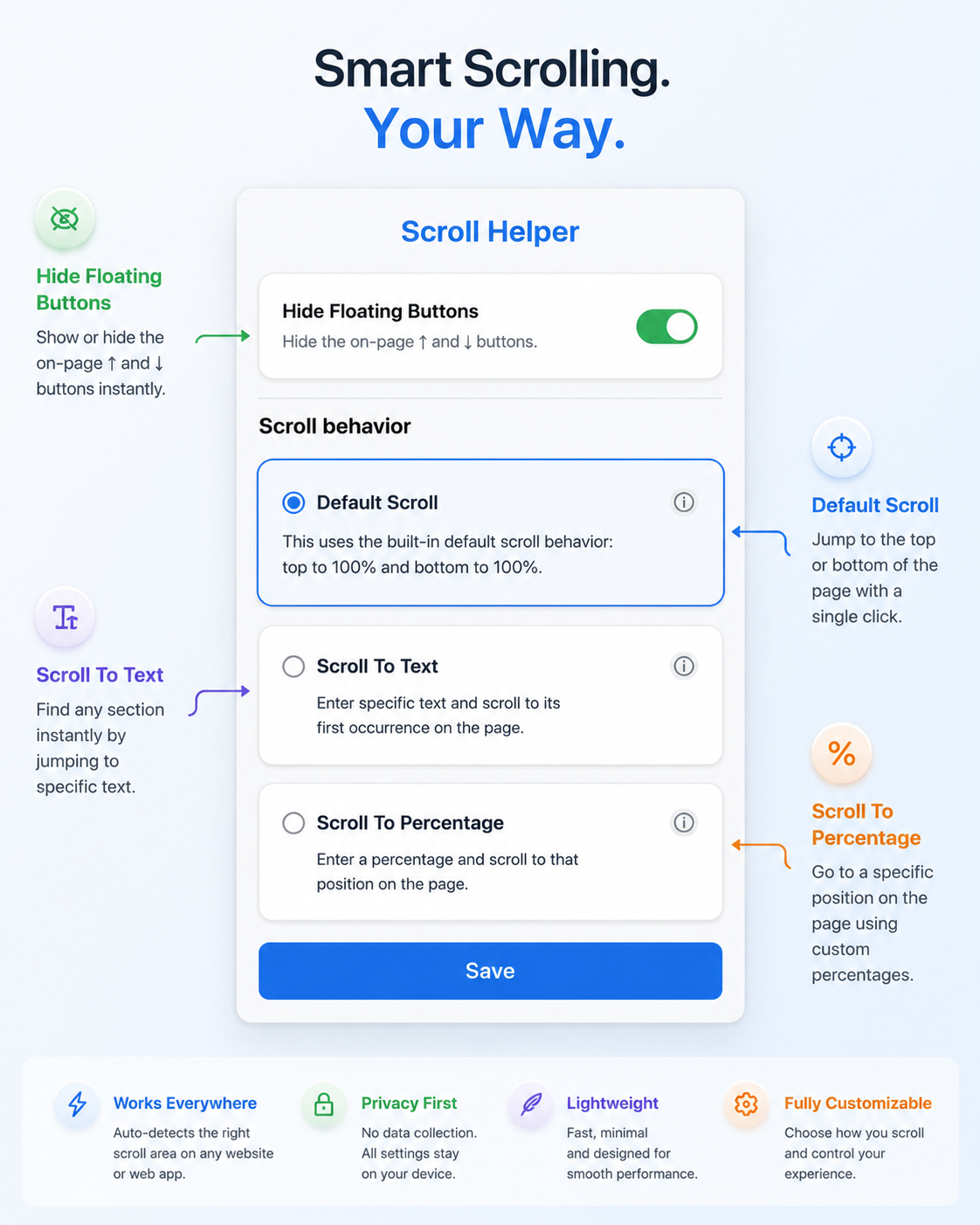
Scroll Helper makes navigating long pages faster by letting you:
- ⬆ Jump to the top
- ⬇ Jump to the bottom
- Scroll to specific text
- Scroll to custom percentages
- Disable the buttons when not in need
It automatically detects the active scrollable area, making it work on both traditional websites and modern web applications.
Features
Default Scroll
The default mode behaves like traditional scroll buttons.
- ↑ Scroll to the top of the page
- ↓ Scroll to the bottom of the page
Scroll to Text
Configure each button to jump to specific text on the page.
Example:
↑ Button → Introduction
↓ Button → Contact Us
The extension searches the page for the entered text and smoothly scrolls to the first matching result.
- Case-insensitive search
- Exact matches preferred
- Falls back to partial matches
- Displays a notification if no match is found
Scroll to Percentage
Jump to custom positions on the page.
Example:
↑ Button → 10%
↓ Button → 10%
This scrolls:
- ↑ to 10% from the top
- ↓ to 10% from the bottom
Hide Floating Buttons
Prefer a cleaner browsing experience?
Use the popup toggle to instantly hide or show the floating buttons.
Smart Scroll Detection
Many modern websites use custom scroll containers instead of the browser window.
Scroll Helper automatically detects the active scrollable element and works on websites such as:
- ChatGPT
- GitHub
- Gmail
- Notion
- Jira
- X (Twitter)
- and many more
Privacy
Scroll Helper respects your privacy.
It:
- Does not collect personal information
- Does not track browsing history
- Does not send webpage content anywhere
- Does not require an account
All settings are stored locally using Chrome Storage.
Installation
Chrome Web Store
Install directly from the Chrome Web Store:
(Add your Chrome Web Store link here once published.)
Install from Source
- Clone the repository
git clone https://github.com/nishant-10/scroll-helper.git
- Open Chrome
chrome://extensions
-
Enable Developer Mode
-
Click Load unpacked
-
Select the project folder
Project Structure
scroll-helper/
│
├── manifest.json
├── popup.html
├── popup.css
├── popup.js
├── content.js
├── icons/
└── privacy.md
Roadmap
Planned improvements include:
- Custom button position
- Custom themes
- Adjustable button size
- Keyboard shortcuts
- Favorite scroll locations
- Remember settings per website
- Improved text search performance
- Additional scrolling modes
Support
Documentation and support:
- Support: support.md
- Privacy Policy: privacy.md
Contributing
Bug reports, feature requests, and pull requests are always welcome.
If you discover an issue or have an idea for a new feature, please open an issue on GitHub.
License
MIT License
Made with ❤️ to make navigating long webpages easier.